AI-generated images are becoming increasingly realistic, making them harder to distinguish from genuine photographs. Whether you're verifying social media posts, reviewing digital artwork, checking images for school or work, or evaluating visuals before publication, identifying an image's origin can help you make more informed decisions. A free online AI image detector can help assess whether an image may have been generated by AI.
In this guide, you'll learn how to check images for AI-generated content, interpret detection results, understand the limitations of these tools, and choose a suitable detector for your needs.
In this article
How to Check If an Image Is AI Generated
Confirming visual authenticity requires a multi layered strategy. Combining an automated AI detector for images with careful manual visual inspection and source verification offers the most reliable way to spot synthetic content.
Use an AI Image Detector
The fastest way to verify visual content is by running an automated scan. Humbot AI Image Detector serves as a leading ai detector image solution designed to analyze visual files instantly across modern generative models.
Humbot
4.9/5.0
- Multi Model Coverage: Identifies synthetic artifacts from Midjourney, DALL E 3, Stable Diffusion, and Imagen.
- Microscopic Noise Inspection: Scans pixel level anomalies and structural flaws invisible to human eyes.
- High Resolution Upload Support: Humbot supports uncompressed JPEG, PNG, and WebP formats to analyze subtle microscopic details.
- Instant Cloud Processing: Functions as an efficient image ai detector directly inside your web browser.
- Data Privacy Protection: Guarantees uploaded visual files stay encrypted and erase automatically after scanning.
Look for Visual Clues
While generative software improves rapidly, manual inspection often reveals subtle physical errors:
- Anatomical Details: Look for unnatural hands, improper finger counts, malformed teeth, or asymmetrical facial features.
- Lighting and Reflections: Check for inconsistent shadow directions, unnatural light sources, or mismatched eye reflections.
- Text and Backgrounds: Inspect distorted lettering, garbled logos, blurry background objects, or unnatural fine textures.
- Pattern Artifacts: Watch for unusual object transitions, floating items, or repeated visual patterns across the frame.
Check the Image's Source and Metadata
Investigating visual context provides crucial evidence regarding true image origins:
- Identify the Primary Source: Locate the original publisher, creator, or social platform where the image first appeared.
- Review Metadata and Provenance: Check available EXIF data and digital provenance credentials for synthetic generation tags.
- Perform Reverse Image Searches: Search visual databases to find earlier uploads, original contexts, or higher resolution originals.
- Understand Metadata Limitations: Remember that metadata is frequently altered or stripped during social media uploads, meaning its absence alone does not prove an image was AI generated.
How to Use a Free AI Image Detector Online (Step by Step)
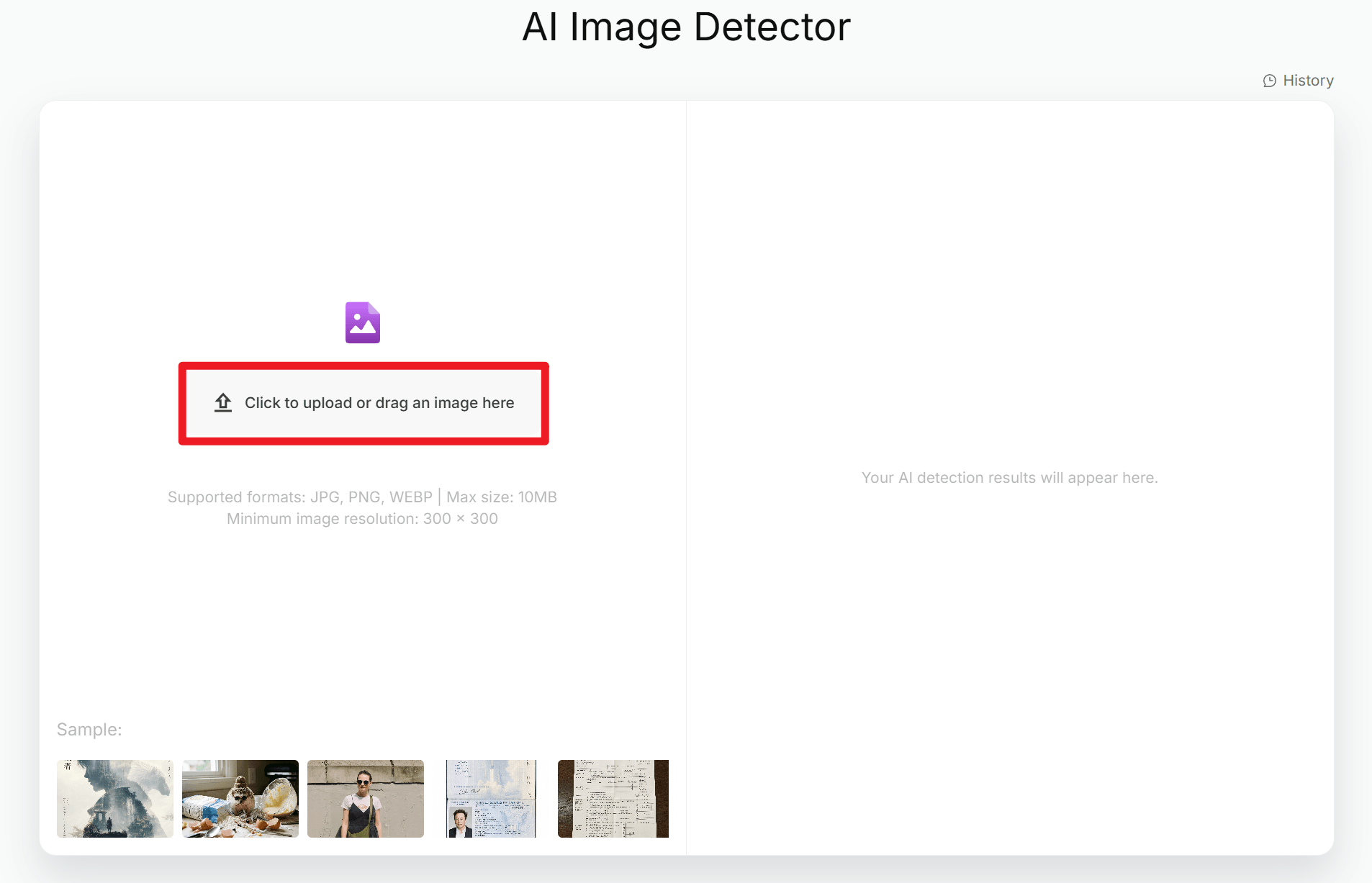
Upload Your Image File: Visit the Humbot AI Image Detector page. Drag and drop your image file into the scanner or choose a photo from your local storage.
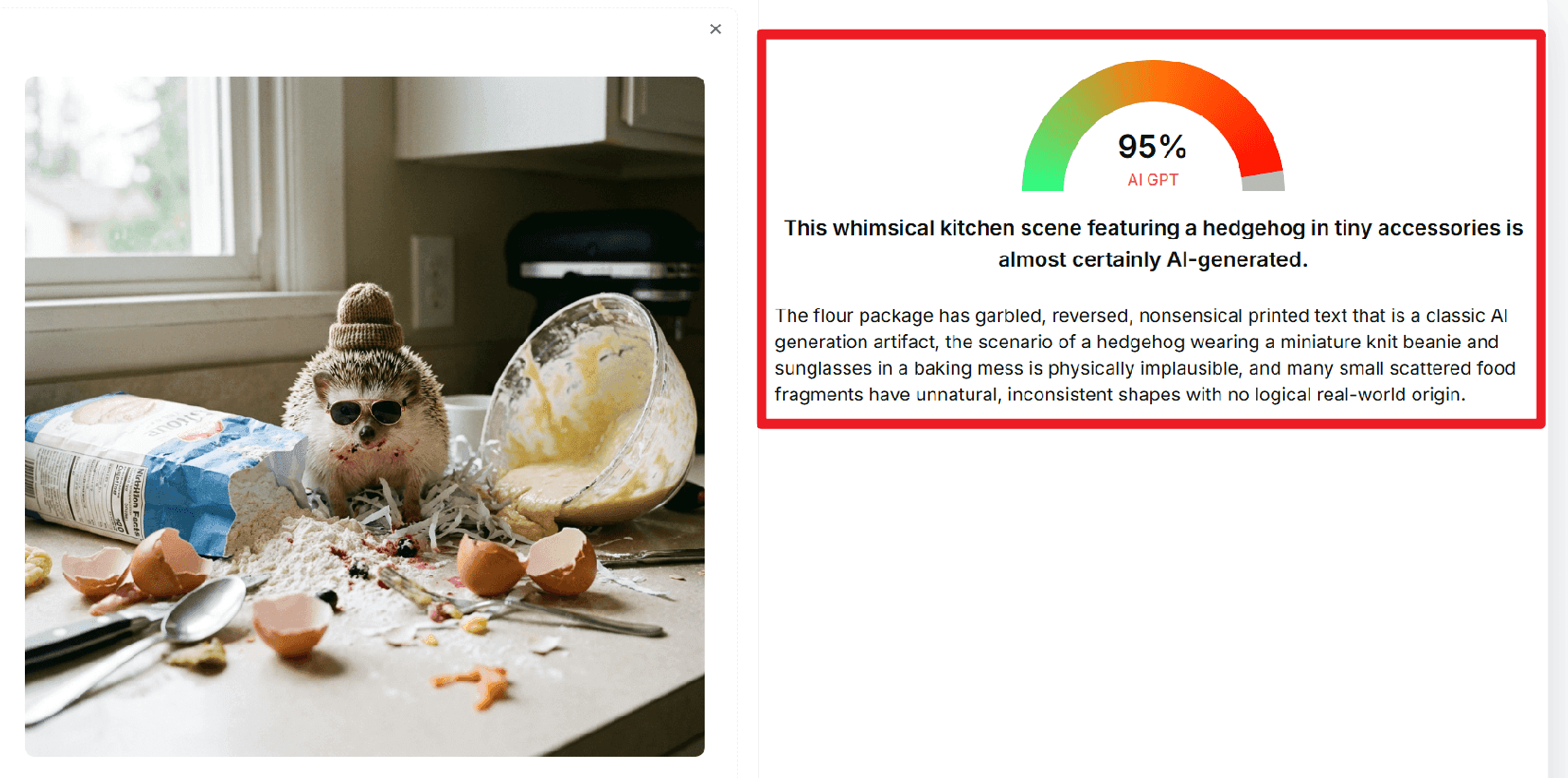
Run the Automated AI Image Detector Check: Humbot uses deep learning algorithms to inspect structural noise, shadow angles, and pixel boundaries instantly.
Review Your Visual Authenticity Score: Receive a clear probability score showing whether the image is human captured or synthetic AI generated.
When Should You Use an AI Image Detector?
Identifying synthetic visuals is crucial across various daily digital workflows to prevent the spread of misleading media.
-
Students and educators
Review the origins of visual material used in assignments, research papers, and learning resources to maintain academic integrity.
-
Content creators and publishers
Assess photos thoroughly before including them in blog articles, social media posts, or editorial content to protect brand trust.
-
Businesses and marketers
Add an extra review step when evaluating submitted user content or third party marketing visuals to avoid copyright complications.
-
Everyday users
Investigate suspicious, viral, or misleading images encountered online to navigate social platforms safely.
While these tools provide valuable insights, automated detection probability scores alone should not be used to make high stakes judgments about personal honesty or the definitive authenticity of critical legal evidence. Always combine algorithmic scanning with human verification.
How an AI Detector for Images Inspects Visual Files
Understanding synthetic media identification is crucial for maintaining digital trust. An ai detector for images uses advanced computer vision to scan for microscopic visual anomalies left by generative engines.
- Pixel Noise Variance: Physical cameras produce unique natural grain, whereas AI generators create uniform mathematical noise patterns. Scanners instantly detect these invisible frequency discrepancies.
- Lighting and Reflection Anomalies: Generative networks struggle with consistent light rendering. Automated tools identify mismatched shadow directions and unnatural glare across eyes, metallic surfaces, and water.
- Anatomical and Background Symmetry: An ai generated image detector analyzes structural flaws. It specifically checks for incorrectly rendered human hands, garbled background text, and impossible geometric transitions within complex repeated textures.
Frequently Asked Questions
Is there a free online AI image detector?
Free access and usage limits vary by tool. Direct readers to Humbot's current tool page for the latest availability.
How can I check if an image is AI-generated for free?
Summarize the upload-and-check workflow, then recommend reviewing the result alongside visual clues and source information.
How accurate is an online ai image detector check?
Advanced ai detector images platforms achieve high accuracy by analyzing microscopic noise patterns and structural lighting. Combining automated scanning with manual visual review yields the most reliable verification results.
Can an AI image detector identify images from Midjourney or DALL·E?
Detection performance can vary by generator and image processing. Do not promise that every image from a particular generator can be identified.
Can AI image detectors make mistakes?
Yes. False positives and false negatives are possible, so users should treat results as one source of evidence.
Can I detect AI-generated images from a screenshot?
Screenshots can be checked if the tool supports their format, but resizing, compression, and cropping may affect results.
Does an AI image detector work on edited or partially AI-generated images?
Results may be less reliable when an image combines real photography, AI-generated elements, and subsequent editing.
Conclusion
Verifying visual authenticity is essential in an era of rapid AI visual generation. Whether you are validating news photos, verifying social media content, or checking design assets, using a reliable free AI image detector protects you from synthetic visual deception.
For a fast, private, and precise verification workflow, Humbot AI Image Detector is your trusted online tool.
🛡️100% Data Privacy • 🚀 Instant Access